
AHCA BA Provider Alert: Place of Service EVV Requirement for Claims in Rejected Status
Place of Service EVV Requirement for Claims in Rejected Status
This message is targeted to all AHCA BA providers in Regions 9, 10 and 11.
AHCA BA has historically required that billing providers submit a place of service (POS)/address type, such as home, school, etc. with every claim. In order to better alert providers that their claim service lines are missing address type, Netsmart has introduced a new VADR (Missing Address Type) claim matching rule.
As a provider, you may see claims in denied status in FMMIS with denial errors 248 (Place of Service Missing or Blank), or 249 (Place of Service Invalid):

In the Tellus EVV system, you may see visits in UNMATCHED status with a VADR error code. To help providers remediate this issue so visits may be released for payment, providers with this issue will now find their claims in a rejected, “matched” or “unmatched” status.
Visits in a “matched” status with address type populated properly may be released for payment. However, any previously MATCHED claims that were incorrectly submitted by the EVV system with missing address type have been reset to NEW to rematch. All of these will revert to UNMATCHED status and the provider will need to add the missing address type as follows:
- Go to Work List – Matched, Unmatched, or Rejected Status.
- Open the line visit.
- Select “Address Type”. (Start and End Address Types are Required)
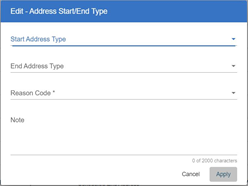
- Please select Reason Code “Other” in the drop-down menu.
- Click Apply to save the updated information.
- Refresh the claim to clear the error
- Re-submit the claim.
Claims that were previously in a RELEASED status but were missing start or end address type have been reset to NEW status to rematch. You will also see the following message next to each of these claims: “Please correct missing address type (place of service) values.”
REJECTED claims that are still missing address type will show as REJECTED in the work list for providers to correct and resubmit. REJECTED claims that are not missing address type will include a note to alert you that the address types have been added and that you can resubmit.
IMPORTANT:
Netsmart submitted a small number of claims with valid address type incorrectly due to a software issue. These claims were denied in FMMIS. Netsmart will correct and resubmit these claims with no need for action on the billing provider’s part.
Please ensure that both the start address type and end address type are selected. Location codes may be found at: https://mobilecaregiverplus.com/ahca-ba-tellus-to-fmmis-location-code-cross-walk/
Additional Information:
To view additional training materials please go to https://mobilecaregiverplus.com/ahca-ba and select the Training & Resources tab. If you have questions regarding training or system registration you may contact TELLUS at: 1.833.622.2422.